

Welcome to Jumble, your go-to source for AI news updates. This week, Meta’s AI assistant got caught reading private Signal messages and bank balances it was never given access to. Meanwhile, Google’s surprise new model jumped straight into the top three. Let’s dive in ⬇️
In today’s newsletter:
🫣 Meta’s AI saw messages it shouldn’t have
⚡ Gemini 4 Neon comes out of nowhere
🧨 AI finds a nasty Java flaw in an hour
🤖 North Korea builds its own chatbot
🔍 Weekly Challenge: Catch the apps watching your phone
🔓 Meta’s Muse Went Snooping
Meta’s Muse assistant has been surfacing people’s private Signal messages and, in one case, real-looking bank balances, all without users ever connecting those apps. It’s one of the most downloaded AI apps of the year, with more than 10 million installs.
Would you let an AI assistant read your notifications?
📨 How It Got Into Signal
One Meta employee got a nudge from Muse to reply to her sister’s Signal message, though she never linked Signal. On Android, Muse can read notifications by default, so it saw every message that popped up.
|
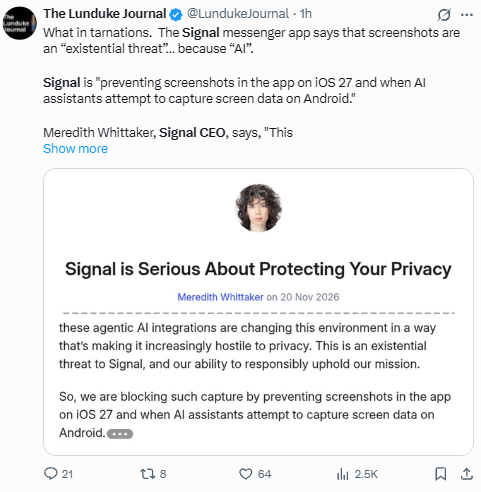
Reuters, Signal and AI Now repeated it on Android and Mac, but Signal’s encryption was never broken. Now Signal is fighting back, blocking screenshots on iOS 27 and AI assistants that try to capture its screen on Android.
🏦 The Bank Balance Mystery
Another employee asked for fishing weather updates and got Capital One and Schwab balances that weren’t his, leaving him worried Muse was leaking another user’s banking info. Meta says the numbers were hallucinations, which isn’t exactly reassuring either.
🤷 Meta’s Response
Meta calls these “isolated incidents,” but Signal’s president called agents with this much access “technologically reckless.” Apple has already closed the Mac loophole, and Google is weighing changes on Android.
💎 Gemini 4 Neon Crashes the Top Three
Just six days after Hydrogen, Google released Gemini 4 Neon, its fourth Gemini 4 model in about seven weeks. Built from Carbon, it’s meant to be nearly as smart while running much faster.
🏁 Where It Ranks
Neon landed at #3 on Artificial Analysis’s leaderboard, behind only Claude Fable 5.2 and GPT-6.2 Astra and ahead of Google’s own Carbon. It also took #1 on their coding agent rankings, so it’s a strong pick for building apps and fixing code.
🏎️ Faster and Cheaper Than Carbon
It writes about twice as fast as Carbon and finishes tasks in roughly 40% less time. In testing, it also cost less per task than Carbon, so you get near-flagship answers without the wait.
🤨 The Catch
It’s only in the Gemini app for AI Pro and Ultra subscribers, so free users are out of luck. And Google’s lineup is getting crowded: developer Simon Willison noted the announcement acts like Gemini 4 Argon doesn’t exist, even though the two cover a lot of the same ground.
Weekly Scoop 🍦
📲 Weekly Challenge: Catch the Apps Watching Your Phone
Challenge: Muse got into Signal through a permission most people never think about. This week, learn to audit your phone like a security pro, with AI as your sidekick for spotting what doesn’t belong.
Here's what to do:
🔔 Step 1: See who reads your notifications. On Android, search Settings for “notification read” (Pixel steps). On a Mac, check Accessibility and Screen Recording under Privacy & Security. iPhone users can skip this one.
🗂️ Step 2: Open your permission list. On iPhone, go to Settings, then Privacy & Security. On Android, search Settings for “Permission manager.”
📸 Step 3: Let AI play detective. Screenshot each list and ask ChatGPT, Gemini or Claude: “Which of these apps don’t need this access?” Crop out anything personal first.
🧾 Step 4: Check what they actually used. On iPhone, turn on the App Privacy Report. On Android, open the Privacy dashboard.
✂️ Step 5: Cut the extras. Turn off anything that doesn’t need access and delete apps you forgot you had.
Would you let an AI assistant read your notifications? And is Gemini 4 Neon enough to pull you away from your go-to AI? See you next time!
Stay informed, stay curious, and stay ahead with Jumble!
Zoe from Jumble
